A clear operational view
Search transfers and inspect their details, current state and payment attempts in the operations dashboard.
THE MONEYLINK PRODUCT TOUR
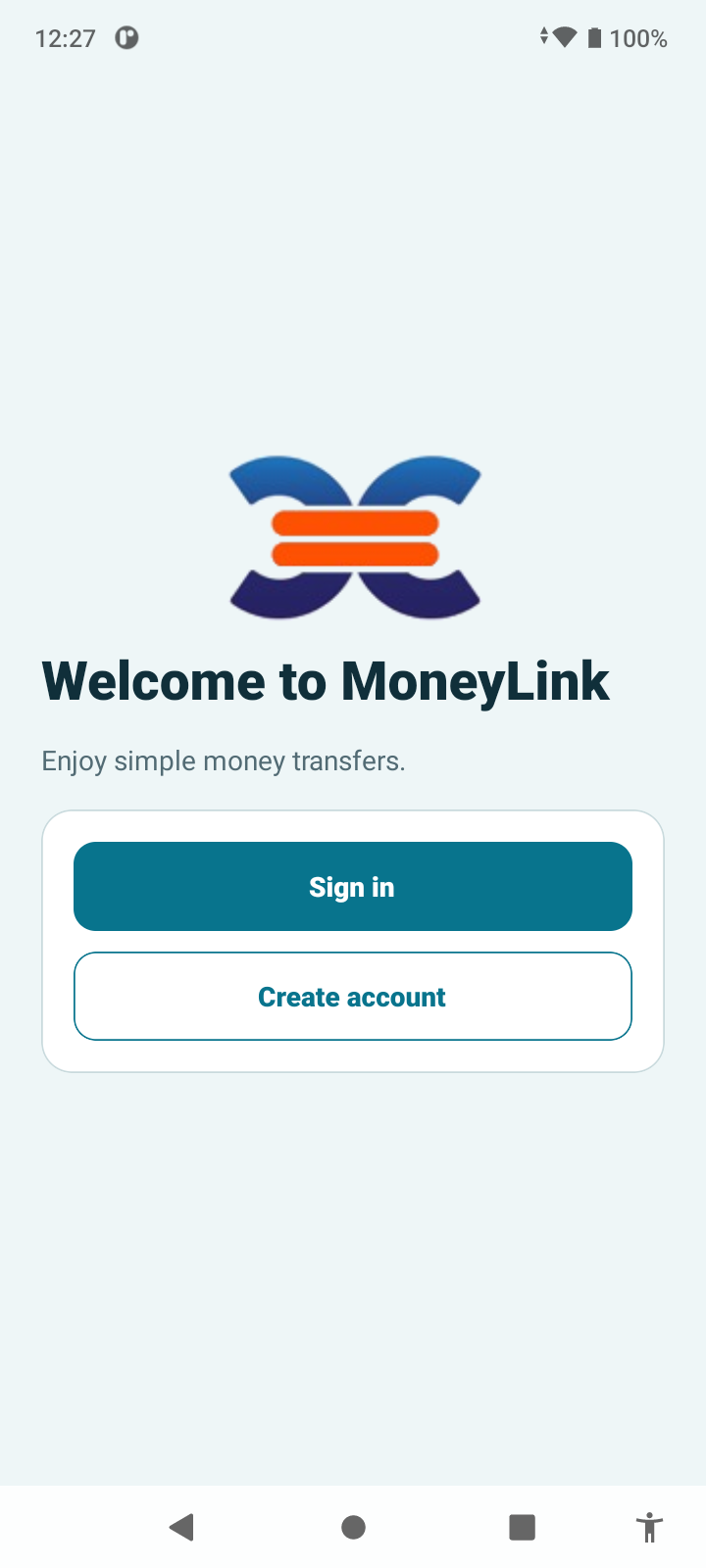
Follow a transfer from the first welcome to a successful payment. See the mobile experience and the records behind every meaningful step.
FROM FIRST TAP TO CONFIRMATION
Follow the sender’s actions alongside the backend milestones. Each highlighted milestone explains when a new business record is saved and why it matters to your team.
Current Android screens use synthetic QA data. Backend captures are in progress. Backend record cards are explanatory illustrations, not dashboard screenshots. Example amounts are not live rate offers.
Start transfer
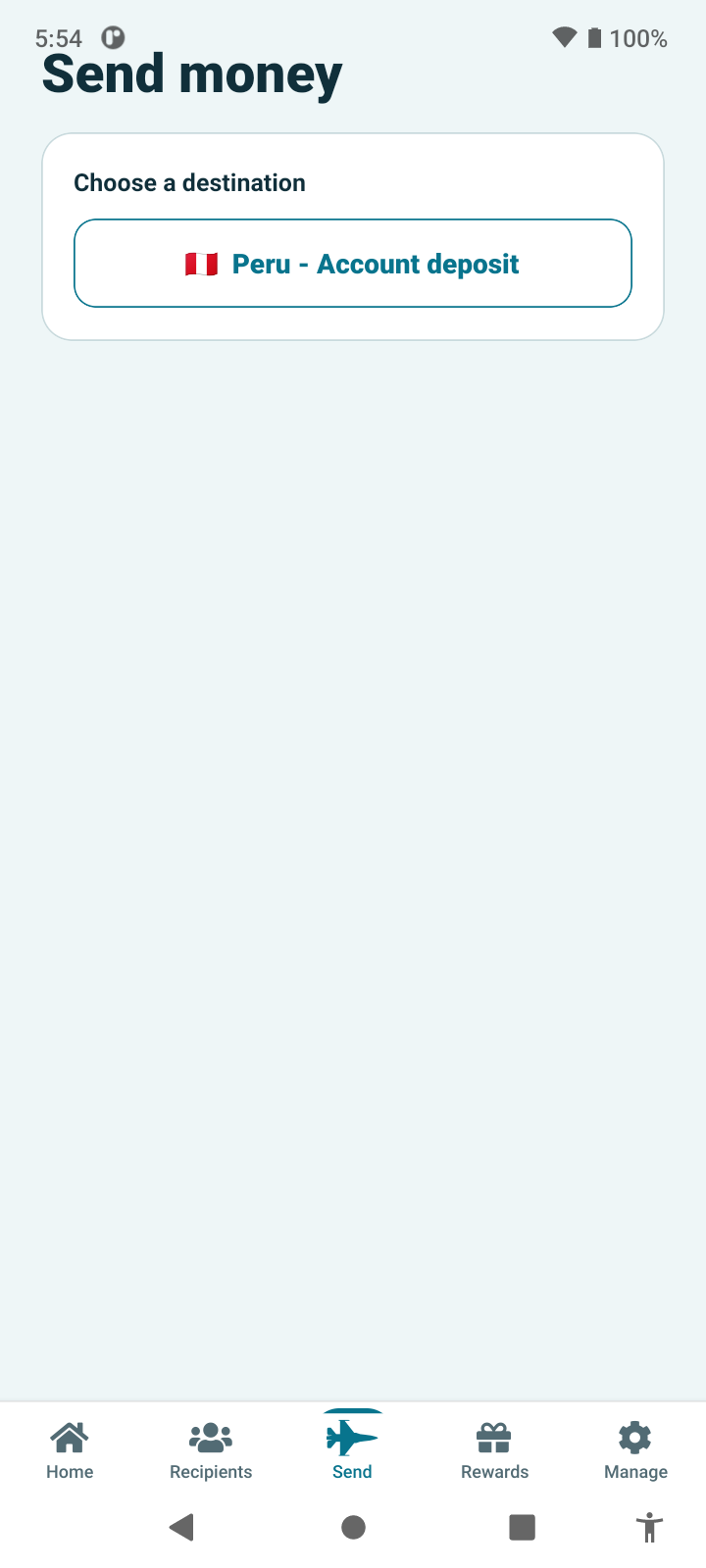
Read existing configurationFrom Home, choose Start Transfer to open Send money. Select the destination and an available delivery method, such as an account deposit. The app guides the sender through the options configured for that destination.
Customers see the destinations and services available to them.
The app reads the destination and service configuration. Opening this screen does not create a transfer.
Amount & quote
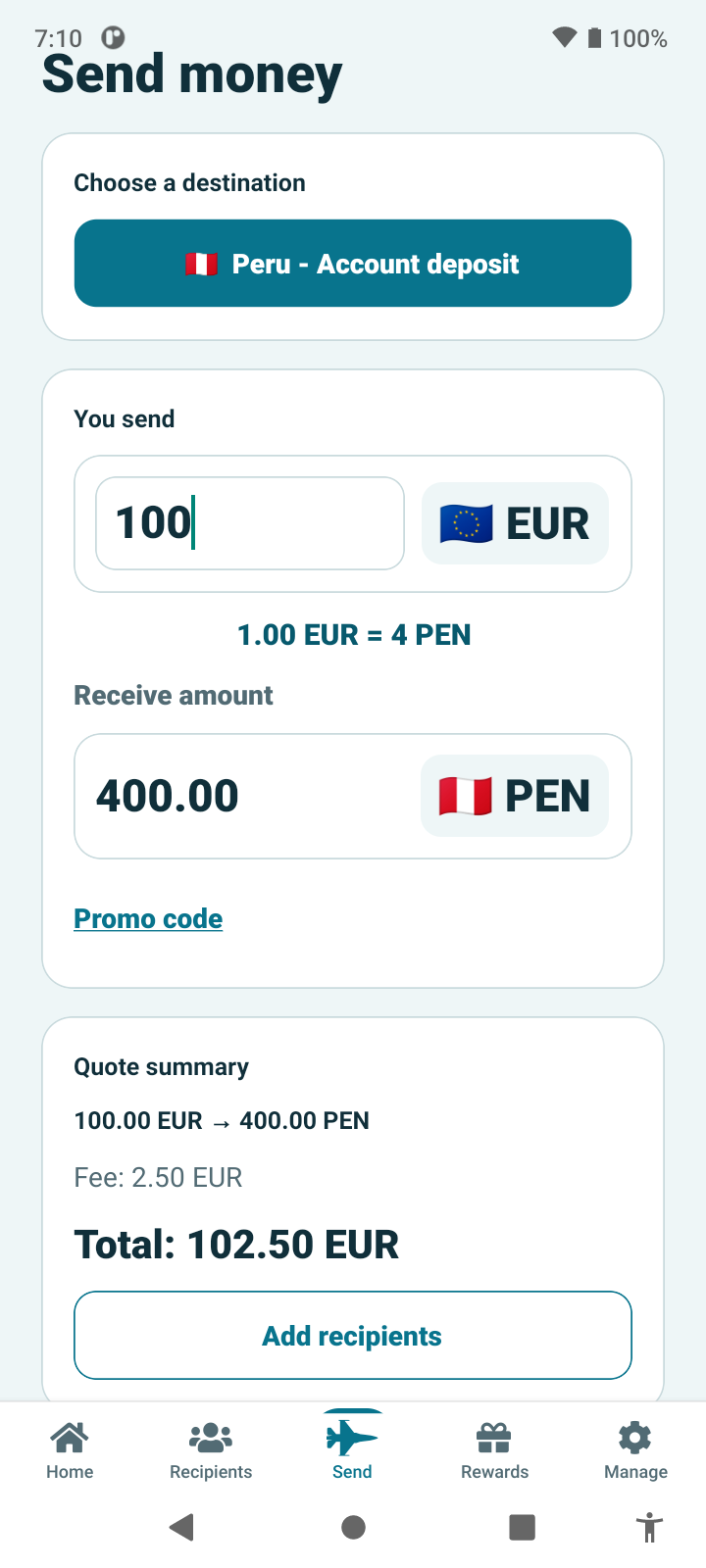
+ New backend recordEnter the amount to send. The quote brings together the exchange rate, the amount the recipient gets, the fee and the total charge. An optional promotion can be applied before continuing.
The sender can assess the complete cost before choosing to proceed.
A quote snapshot records the calculated amounts, pricing configuration and expiry. A new quote can be generated when the amount or promotion changes.
Matching backend screenshot awaiting capture.
quotes
Related audit records may also be written. The list highlights the business records for this journey.
Add recipient
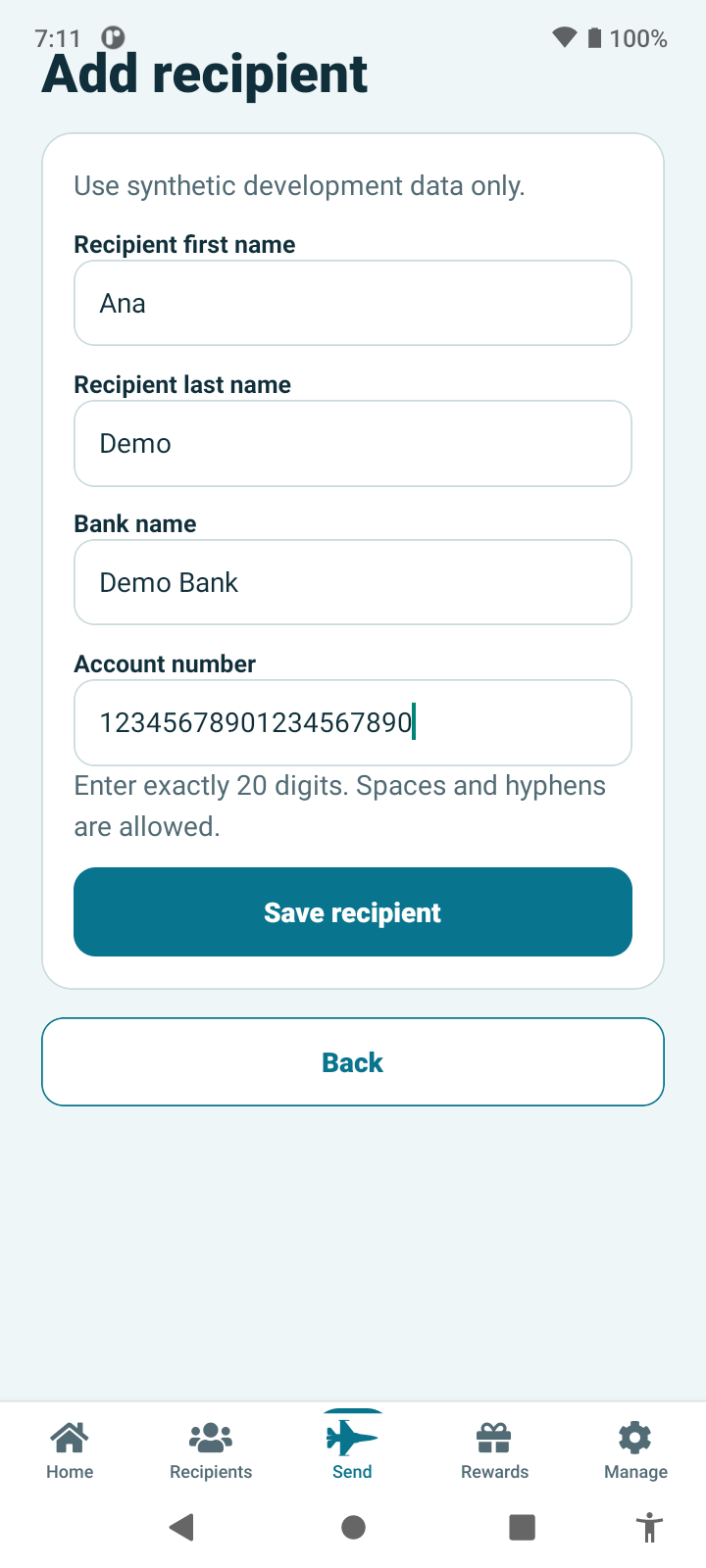
+ New backend recordAdd a recipient using the fields required for the chosen delivery method. For an account deposit, this includes the recipient and bank account details. Saving the recipient makes them available for future transfers.
Returning customers can reuse a saved recipient without entering everything again.
Saving a new recipient creates a beneficiary and its first version. Versioned details preserve which recipient information was used for a transfer.
Matching backend screenshot awaiting capture.
beneficiaries · beneficiary_versions
Related audit records may also be written. The list highlights the business records for this journey.
Create transfer
+ New backend recordChoose a saved recipient, return to the quote summary and tap Continue. This brings the selected recipient and quote together as one transfer draft, ready for the purpose and review steps.
A saved recipient is reused; the transfer gets its own reference and history.
Continue creates the transfer, its first revision, a quote claim and an initial state event. Selecting an existing recipient alone does not create a second beneficiary.
Matching backend screenshot awaiting capture.
transfers · transfer_revisions · transfer_quote_claims · transfer_state_events
Related audit records may also be written. The list highlights the business records for this journey.
Transfer purpose
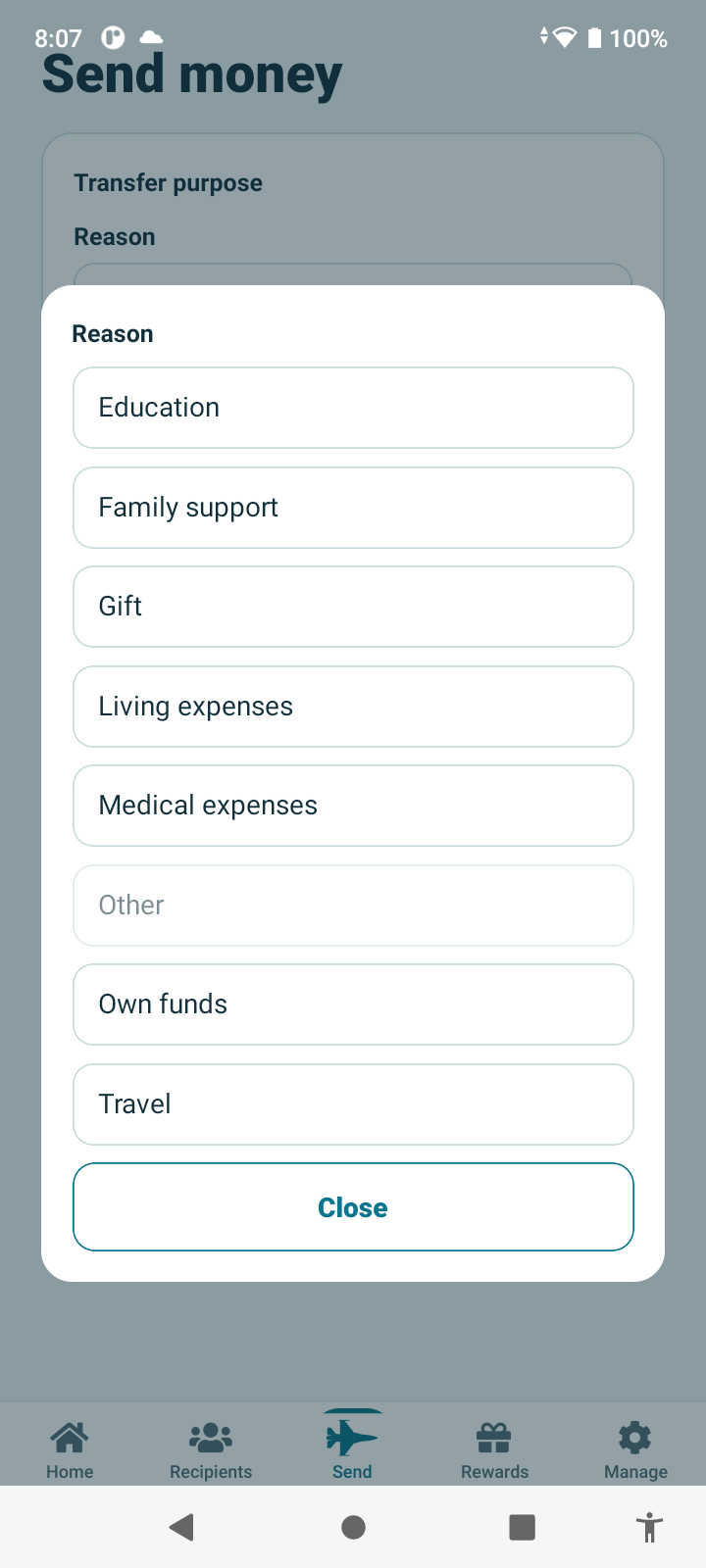
+ New backend recordSelect the reason for sending and the relationship to the recipient. Prepare review saves these choices with the transfer and makes the complete summary available for checking.
The sender provides the transfer context in a guided step.
Preparing review creates a new transfer revision and a review_ready state event. The quote is validated as part of preparing the review.
Matching backend screenshot awaiting capture.
transfer_revisions · transfer_state_events
Related audit records may also be written. The list highlights the business records for this journey.
Review & continue
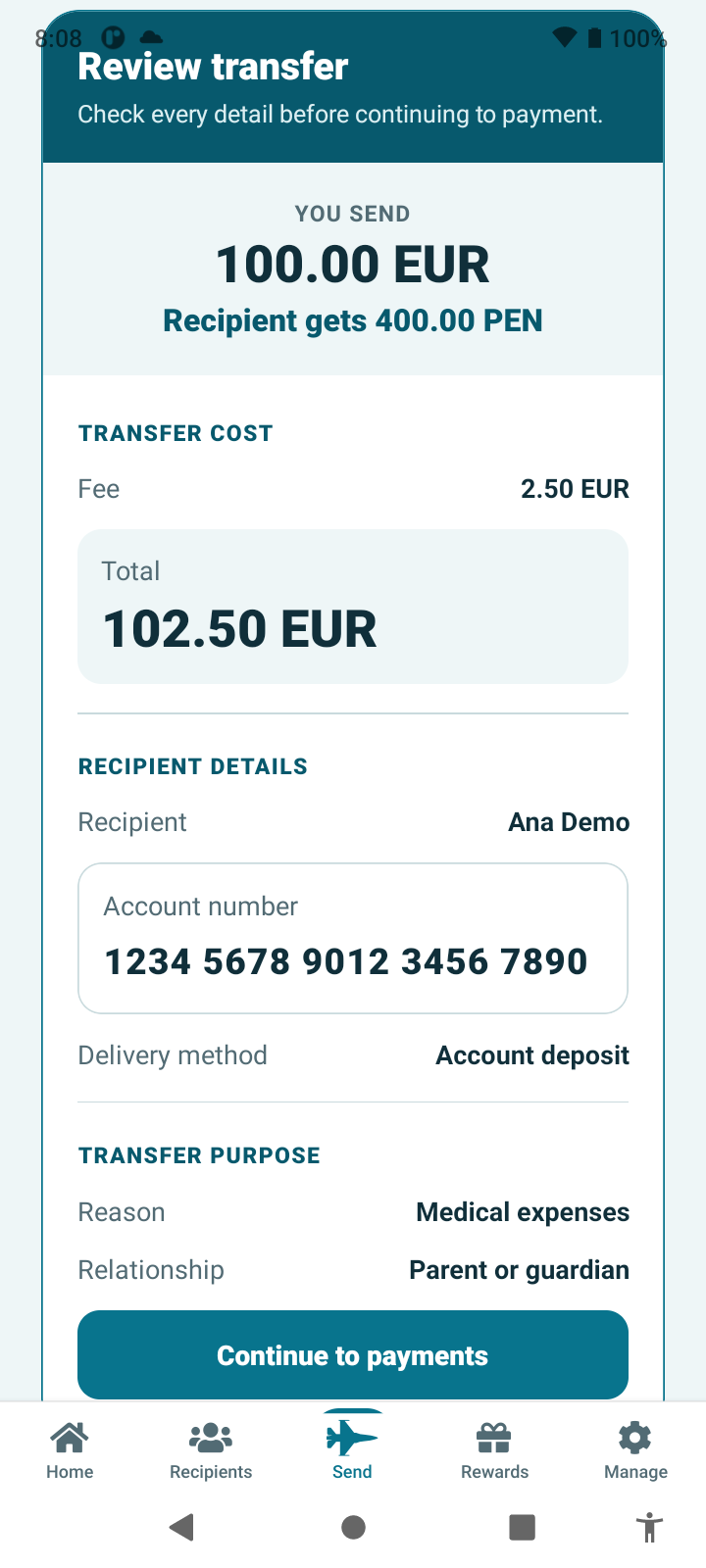
+ New backend recordReview the amount sent, recipient amount, fee, total charge, recipient details, delivery method and transfer purpose. Continue to payment submits the transfer for the required checks before payment becomes available.
One final summary gives the sender a chance to check the details.
A successful submission records the revision under review, the applicable policy, limit reservation, evaluation, rule results and decision. A transfer requiring review waits for that outcome before payment can proceed.
Matching backend screenshot awaiting capture.
transfer_compliance_submissions · compliance_limit_reservations · compliance_evaluations · compliance_rule_results · transfer_compliance_decisions
Related audit records may also be written. The list highlights the business records for this journey.
Payment
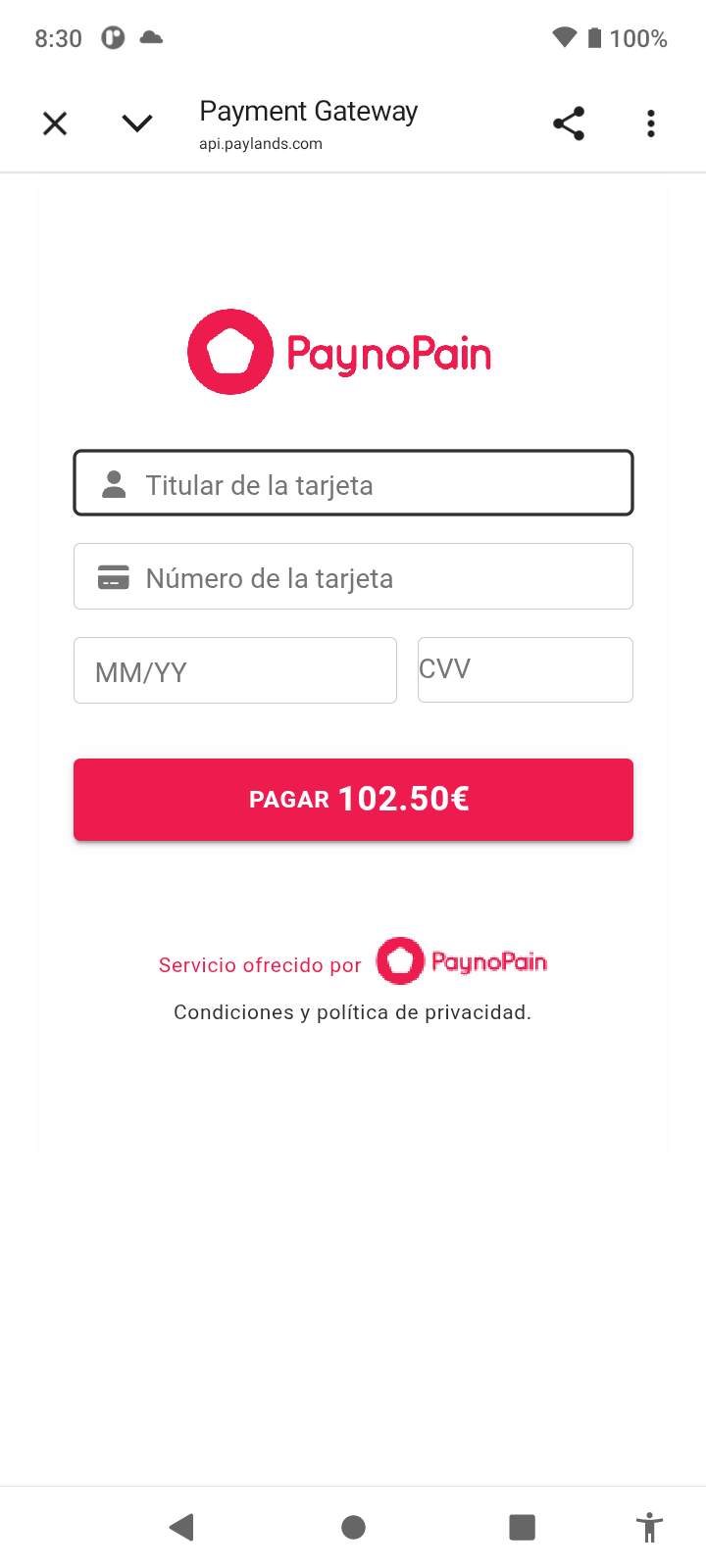
+ New backend recordOnce eligible, the sender opens the hosted checkout to pay. MoneyLink tracks the payment attempt and checks the provider result when the sender returns. An unresolved result remains pending until it is confirmed.
The app distinguishes a confirmed payment from one that still needs confirmation.
Starting checkout creates a payment attempt linked to the exact transfer revision and total charge. Attempt events preserve its progress, including handoff and confirmation states.
Matching backend screenshot awaiting capture.
payment_attempts · payment_attempt_events · transfer_state_events
Related audit records may also be written. The list highlights the business records for this journey.
Successful payment
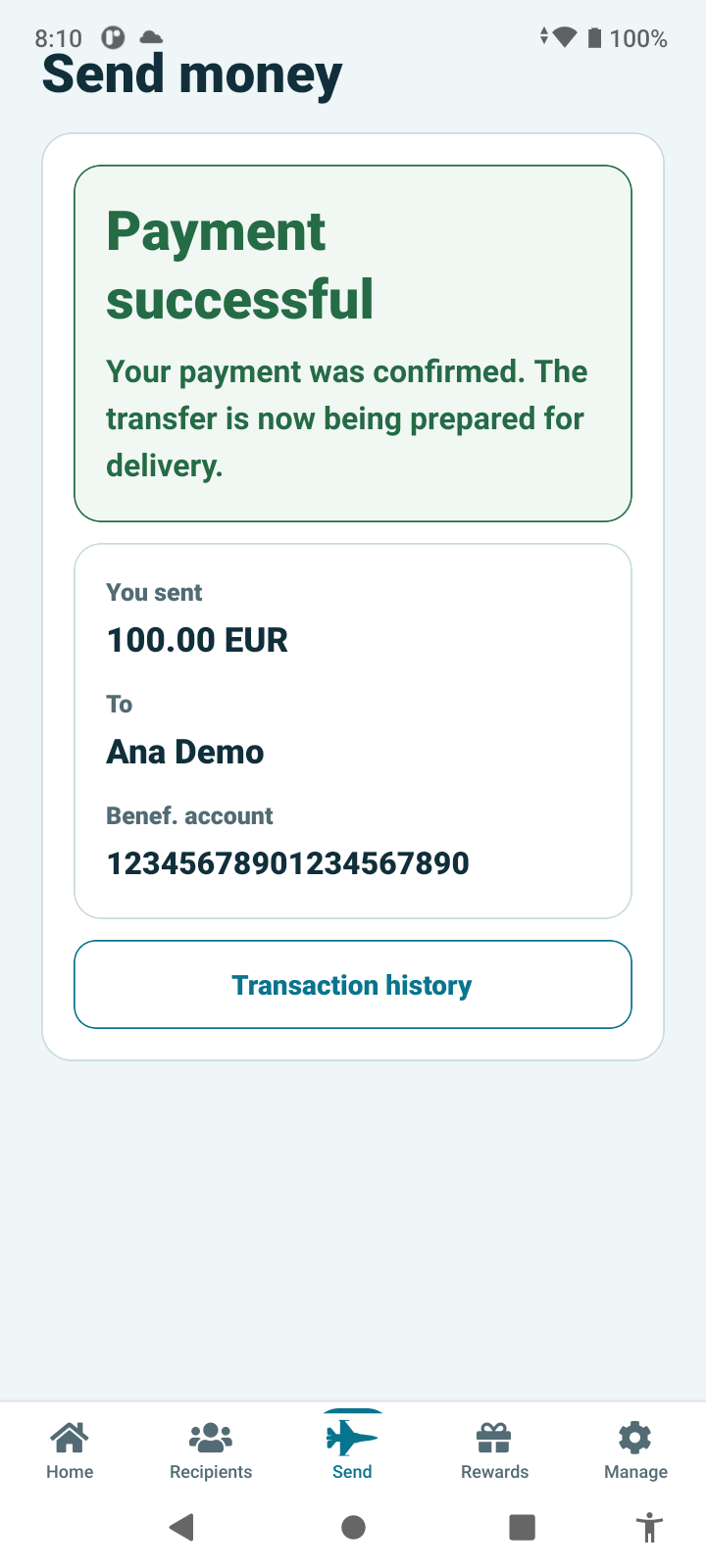
+ New backend recordAfter the server confirms success, the app shows a clear success message and a brief receipt: the amount sent before commission, the recipient and the beneficiary account. Transfer history is one tap away.
Payment confirmation and transfer delivery remain distinct, so the customer can follow what happens next.
Verified provider evidence creates a payment confirmation and a transfer payment hold, with related event history. Successful collection does not itself mean the recipient has been paid; payout proceeds only when its separate checks allow it.
Matching backend screenshot awaiting capture.
payment_provider_events · payment_confirmations · transfer_payment_holds · payment_attempt_events
Related audit records may also be written. The list highlights the business records for this journey.
THE OPERATIONS VIEW
Follow the transfer from pricing to confirmed payment. The backend links the recipient, transfer revisions, checks and payment evidence so your team can understand how the transaction reached its current state.
Search transfers and inspect their details, current state and payment attempts in the operations dashboard.
Verification, compliance and payment outcomes determine which actions are available as the transfer progresses.
Transfer revisions and recorded events connect the customer’s choices with the backend’s decisions.
SECURITY & COMPLIANCE
A payment platform needs more than a smooth app. MoneyLink combines protected customer data, controlled staff access and traceable transaction decisions with a clear separation between collection and payout.
Customer identity fields are encrypted at rest. Session tokens are stored as hashes on the server; the mobile app uses secure device storage. Ownership checks restrict access to each customer’s records.
Implemented software controlsRole-based permissions govern dashboard access. Sensitive customer detail requires a specific permission, while governed operational workflows separate preparation from approval.
Permissions and accountable actionsThe backend checks the provider evidence against the exact order, amount and currency. Idempotent processing and a single active attempt help prevent duplicate payment actions.
Server-confirmed payment outcomesThe payment provider handles card entry and the authentication challenge in hosted checkout. MoneyLink’s mobile app does not receive the raw card details. The current integration is a sandbox implementation.
Card data stays outside the appVersioned verification and compliance decisions, configurable limits and review cases support the transfer workflow. Missing or unresolved eligibility prevents progression. Live KYC and screening qualification remain production requirements.
Checks linked to the transfer revisionTransfer revisions, state events and payment confirmations preserve the history behind a transaction. A confirmed payment is kept separate from beneficiary delivery and its independent payout checks.
History your operations team can inspectTHE EUROPEAN REGULATORY FRAMEWORK
The following map covers key EU frameworks relevant to a remittance service. The complete obligation set depends on the licensed operator, Member State, payment services, partners and corridors, including destination-country law. Software features alone do not establish conformity.
PSD2 governs payment services, including authorisation, customer information, payment rights and security. Its authentication rules include dynamic linking for applicable remote electronic payments. MoneyLink’s hosted provider flow, exact amount checks and server-confirmed outcomes are relevant controls; they do not by themselves prove PSD2/SCA conformity.
To establish conformity: confirm the operator’s authorisation and service scope, safeguarding, disclosures, complaints and refund obligations, plus the provider’s SCA/3DS responsibilities and evidence. Track the PSD3/Payment Services Regulation reform and its eventual applicable transition dates.
PSD2 · Directive (EU) 2015/2366 ↗European Commission · payment services reform ↗The EU anti-money-laundering framework addresses customer due diligence, risk assessment, monitoring and suspicious-activity reporting. MoneyLink provides versioned verification, transfer evaluations, limit checks and review-case workflows. Synthetic checks in QA are not live identity verification or sanctions screening.
Operational requirements: approved risk policies, qualified data and screening providers, beneficial-ownership and PEP controls where applicable, reporting procedures, retention and trained accountable staff. Plan for the new EU AML package alongside the currently applicable national framework.
Council of the EU · AML package ↗GDPR requires a lawful and accountable basis for processing personal data, with appropriate security and respect for individual rights. Encryption, access restrictions and minimised operational output support that work.
Operational requirements: controller and processor responsibilities, privacy notices, lawful bases, retention and legal holds, data-subject requests, breach response, processor contracts and safeguards for international data transfers. These require an approved privacy programme; encryption alone is not GDPR compliance.
GDPR · Regulation (EU) 2016/679 ↗DORA has applied since 17 January 2025 to financial entities within its scope. It covers ICT risk management, incident reporting, resilience testing and third-party technology risk.
Operational requirements: determine the operator’s scope, maintain an ICT risk framework and supplier register, assess contracts, test recovery, and establish reporting and oversight. Application audit history is useful evidence, but it is not a DORA assessment or certification.
European Banking Authority · DORA ↗Regulation (EU) 2023/1113 sets requirements for payer and payee information accompanying transfers of funds within its scope. MoneyLink links the customer, beneficiary and transfer revision, but payout-provider message mapping and verification must also be demonstrated.
Operational requirements: validate required information, verification rules, handling of missing details and the responsibilities of each payment-chain participant for the relevant corridor.
Transfer of Funds Regulation · (EU) 2023/1113 ↗EU restrictive measures can limit transactions involving designated people, entities, sectors or territories. Their applicability changes with the parties and the corridor.
Operational requirements: current sanctions data, ownership and control checks, escalation and freezing or rejection procedures where required, plus corridor-specific legal review. A configured destination or a demo compliance decision does not authorise transactions to that destination.
European Commission · EU restrictive measures ↗The Instant Payments Regulation introduces obligations for in-scope euro credit-transfer services, including verification of payee, with phased deadlines. Cross-border payment rules also address charges and currency-conversion transparency.
Operational requirements: assess the institution and service scope, applicable deadlines, scheme participation, provider support and disclosures. The EUR-to-PEN demo is not evidence of SEPA Instant or verification-of-payee support.
Instant Payments Regulation · (EU) 2024/886 ↗Cross-border payments · Regulation (EU) 2021/1230 ↗The European Accessibility Act has applied since 28 June 2025, including to consumer banking services within scope. Accessible design should cover the complete journey, including authentication, documents, payment and support.
Operational requirements: assess scope and any applicable exemptions or transitional provisions, test with assistive technologies, document accessibility and remediate barriers. A responsive website or labelled app controls alone do not demonstrate full conformity.
European Commission · European Accessibility Act ↗Framework references checked 7 September 2026. This is a product and regulatory overview, not an exhaustive legal opinion. National implementation, consumer and e-privacy rules, contracts and corridor-specific requirements also need assessment. PCI DSS is a payment-card industry standard, not an EU regulation; no PCI certification is claimed here.
LET’S TALK ABOUT YOUR BUSINESS
Discuss the mobile journey, destination services and operations experience with our team.
Talk to our team Back to the welcome screen ↑